
3rd grade multiplication · Unit 4
Use AI to help with division homework
You use the AI. Your child does the thinking. This page explains how the class teaches division and what to say tonight, and it has a free practice sheet with the answer key on its own page.
If you use AI: snap one problem, get help and more practice
Already seeing your child photograph homework so AI can solve it? This box is the grown-up version: the AI gives you hints and new practice, and your child still works the problem on paper.
For a problem that isn’t like the ones on our sheet, use your own AI account to get it explained and get 5 more like it. The photo goes to your AI account and never reaches AiWhizzkids.
Where AI can go wrong on this skill
AI may teach long division or talk about how many times a number “goes into” another, which isn’t how 3rd grade shows it. Check that it explains sharing into equal groups and links back to a multiplication fact.
- Photograph one printed problem only. Crop out your child’s name, school, teacher and handwriting.
- Open your own AI account (ChatGPT, Gemini or similar). Most require users to be 13 or older, so you hold the phone.
- Upload the photo and paste this prompt:
This is a math problem from my child's 3rd-grade homework. Please help me, the parent.
1. Type the problem back exactly as you see it, including any words. If a picture, table or diagram is part of it, describe it in words. If anything is unclear or cut off, say so instead of guessing.
2. Tell me what kind of problem this is (for example a two-step word problem, the distributive property, regrouping or an area model) and which strategy the worksheet seems to want.
3. Explain that strategy to me in plain words, the way a 3rd-grade teacher would, in 5 sentences or fewer. Don't use a shortcut my child hasn't learned.
4. Give me 3 questions I can ask my child to get started. Hints only, no answers.
5. Write 5 new practice problems of the same type, with the same strategy and the same size of numbers. Number them. No answers next to them.
6. Put an answer key at the very end, with one line of working for each.
Don't solve the original problem. My child will do that.
Show each one as sharing into equal groups, and link it to its multiplication fact.
If it’s a story problem, add this line to the end of the prompt too:
Keep the same kind of story and the same operations, but change the names, things and numbers. Make one problem include an extra number that isn't needed.
- Check before you print:
- Does the problem it typed back match the photo exactly?
- Did it name the same strategy your child’s worksheet uses?
- Work one new problem yourself and compare it with the key.
- If the problem has a picture (an array, a number line, a clock), check the AI’s description of it. If the description is wrong, type the problem out instead of using the photo.
- If anything looks off, ask again in a new chat. If two answers differ, trust neither.
- Does the matching multiplication fact check out?
- For a story problem, read each new problem. Does it make sense, and does it need the same operation?
Your child works on paper. Follow your school’s AI rules.
How your child’s class teaches it
In 3rd grade, division starts as fair sharing. 12 ÷ 3 means 12 things shared equally into 3 groups. The answer is how many end up in each group, which is 4.
Your child will often solve it by dealing, the way you’d deal cards: one for this group, one for that group, round and round until none are left. Then they count one group. Later they skip the dealing and think of the multiplication fact instead. 3 groups of what make 12? 3 × 4 = 12, so 12 ÷ 3 = 4.
That link is why classes teach fact families. The numbers 3, 4 and 12 make four facts: 3 × 4 = 12, 4 × 3 = 12, 12 ÷ 3 = 4 and 12 ÷ 4 = 3. If your child knows the multiplication, they already know the division.
Division story problems ask one of two questions. Sharing asks how many go in each group. The other kind asks how many groups: 12 cookies with 4 on each plate is 12 ÷ 4 = 3 plates. Both kinds show up on 3rd grade worksheets.
In the Common Core standards, sharing and making groups are 3.OA.2, the story problems are 3.OA.3, and the link to multiplication is 3.OA.6. Texas, Florida, Virginia and some other states use their own standards, so follow the method on your child’s worksheet.
What to say tonight
“How many are we sharing? How many groups are we sharing them into?”
“Deal them out one at a time. How many ended up in each group?”
“What multiplication fact matches? Does it check out?”
The mistake to watch for
The usual slip is unequal groups. When your child deals by hand and loses track, one group ends up with 5 and another with 3. The total is still right, but the answer isn’t. Before your child writes anything, have them count every group and check that they all match.
In story problems, check which number is the total. In “There are 4 bags, and 20 marbles are shared between them,” the 20 comes second but it’s the total, so the problem is 20 ÷ 4, never 4 ÷ 20.
Free practice sheet
The sheet has 10 problems on one page: 4 pictures to read, 3 story problems and 3 fact families to write. The answer key is on page 2, so you can print page 1 on its own.
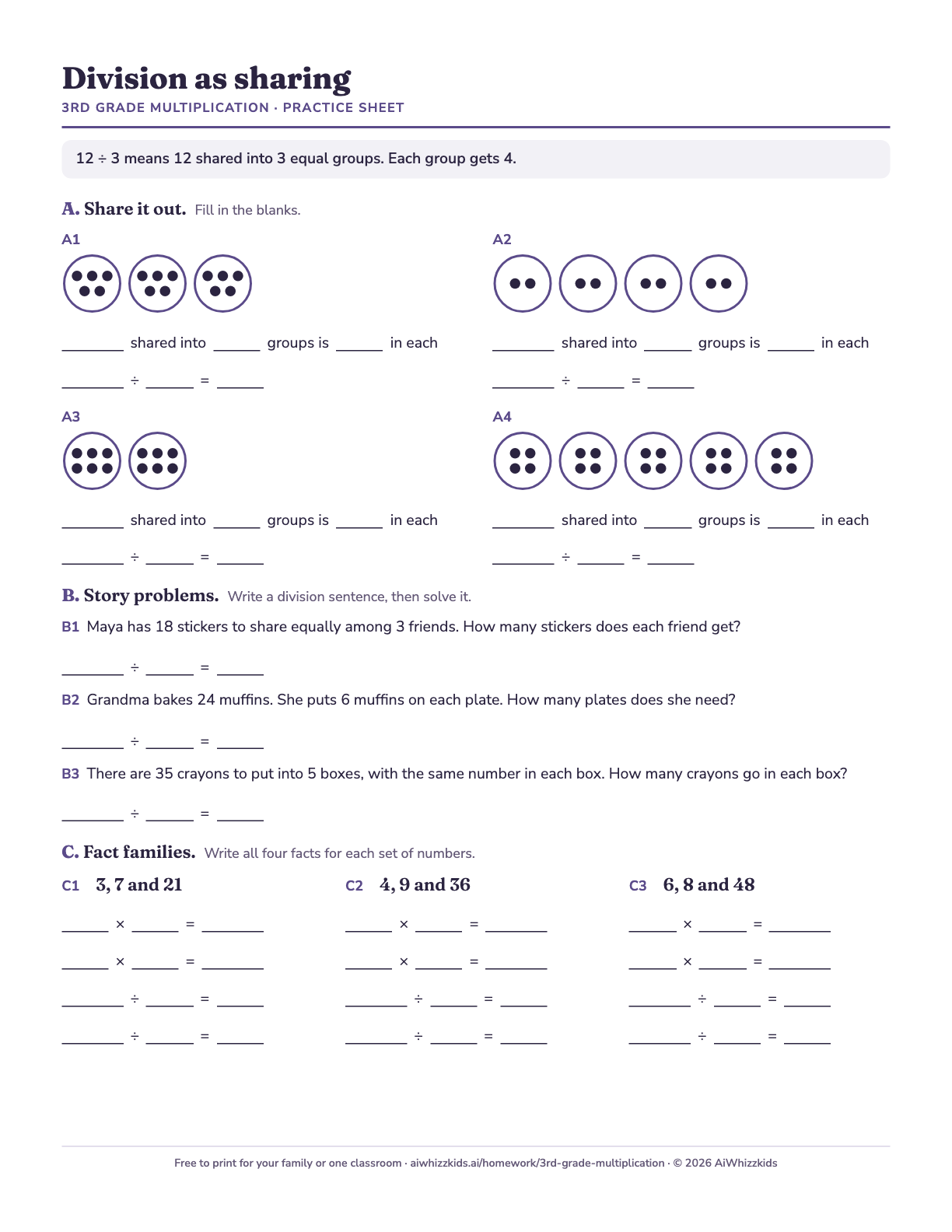
Free to print for your family or one classroom. No email needed. Every answer on the key is computed by code.
Doing this every night? The Grade 3 Multiplication Catch-Up Plan is three weeks of 10-minute printable sessions, with answer keys checked in code. It’s $14.99 and ready to print. See the plan on Payhip
Rather skip the AI account? We’re thinking about building the photo step into this page.
Snap your worksheet (beta)
It isn’t built yet. The idea: you take a photo of one printed problem, and this page names the problem type and makes matching practice with an answer key, with no AI account of your own. If you’d use it, join the waitlist. If enough parents want it, we’ll build it and email you first.
AiWhizzkids is not affiliated with or endorsed by OpenAI, Google, Microsoft or Anthropic. Most AI chatbots require users to be 13 or older (Claude requires 18), and these guides are for parents using their own accounts. AI can be wrong, so check its answers. Follow your school’s AI policy.
Checked by AiWhizzkids on October 23, 2026. Drafted with AI help. Every answer key is computed by code.
Other units
Unit 1
Equal groups
What 4 × 6 means in 3rd grade, how your child draws it, and the story problems that use it.
Open the unitUnit 2
Arrays
Dots in rows and columns, and why 3 × 5 and 5 × 3 have the same answer.
Open the unitUnit 3
Break-apart facts
How to split a hard fact like 7 × 8 into two easier ones, and what the parentheses mean.
Open the unitUnit 5
Facts by strategy
How 3rd graders use facts they know, like 10 × 8, to work out the ones they don’t.
Open the unitUnit 6
Two-step word problems
How to find the hidden first step, write the problem with a letter, and check that the answer makes sense.
Open the unitUnit 7
Missing numbers
How to solve ? × 7 = 42 and 48 ÷ ? = 6, and why division is a multiplication fact in disguise.
Open the unitUnit 8
Multiplying by tens
How 7 × 40 becomes 28 tens, and why the class talks about tens instead of adding a zero.
Open the unitAll units
3rd grade multiplication
See all units